Watch ledger

Kadranname

A collection app that keeps your watches, the days you wore each one and how accurately they run in one place. Your collection is kept on your phone. No account, no server.

Coming soon to the App Store and Google Play

For iPhone and Android phones; it also works on tablets and foldables.

Kadranname's Collection screen: the On your wrist today strip at the top, a two-column grid of watches below.

Features

What is in the app

01Collection

A page for every watch

Add your watches with your own photos; you choose the square crop. Each watch has its own page, with specifications, history, photos, service history, documents and value on separate tabs.

Fetch the technical fields from the maker's product page or type them in. Invoices and warranty cards are attached to the watch, and you are reminded when a service is due. The Value tab shows the purchase price, the cost per recorded day and, if you like, the current range of listings.

History, current listing prices and comparables come from an AI provider you choose, with your own API key; everything else works without one.

A watch's page: its photo, name and style, the Summary, Specs, History, Photos and Service tabs, diameter, movement and last reading.

02Journal

Which watch, which day

Record the watch on your wrist each day with one tap or a wrist photo. The photo is compared on the phone with the watches in your own collection only; the app offers the closest candidates and you confirm.

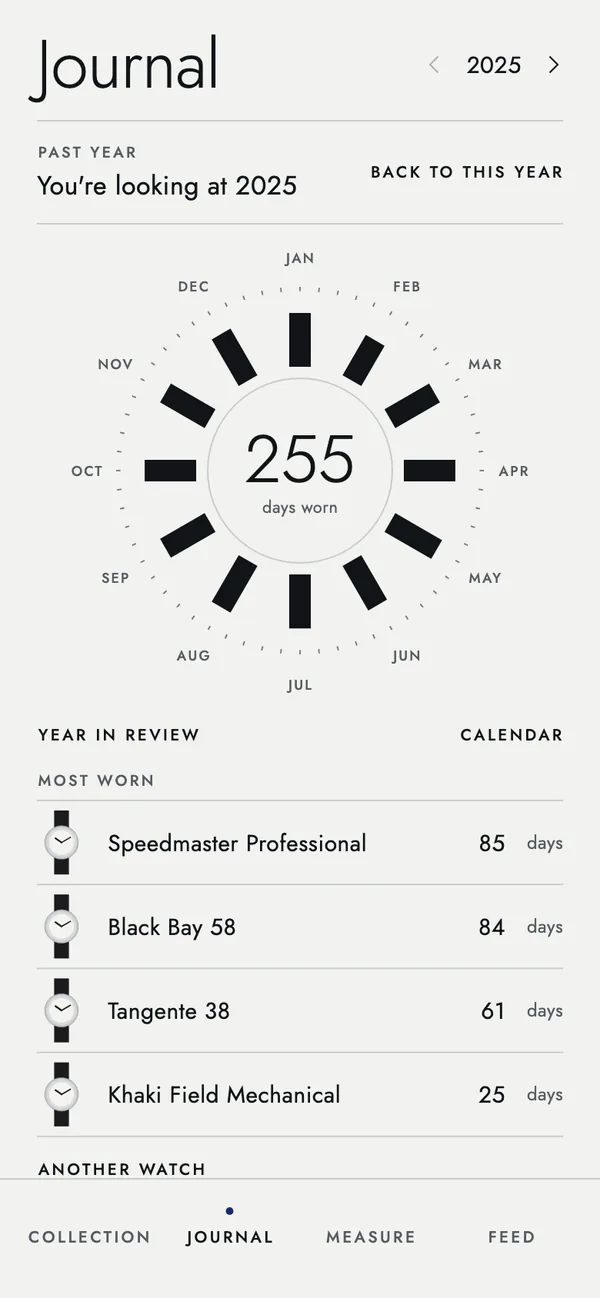
The year dial lays out the months like a watch dial. The five most worn watches, the one waiting longest, a calendar of wear days and the year in review are here too; tap a watch in the list and the dial shows that watch alone. You can share the year as a picture.

The Journal screen: the dial of a past year with 255 days in the centre, the most worn watches below.
The match screen after a wrist photo: the suggested watch, two other candidates below and a Yes, save button.

03Measure

How far your watch drifts each day

Hold a mechanical watch to the phone's microphone: the ticking gives the beat rate, the daily rate and the beat error. A quartz watch's second hand is read with the camera against network time. There are photo and tap methods too, and every reading goes into the watch's history.

Results are for information. A measurement made with a phone does not replace a professional measuring instrument; do not base a service decision on it alone.

The Measure screen, microphone tab: an instant rate of +4.2 seconds a day, a rate scale and a start listening button.

04Feed

What you follow, on one page

Add the watch blogs you read, the YouTube channels you watch and the shops that sell watches or straps; new articles, videos and products gather in one feed. The app reads the sources directly, with no service in between.

X and Instagram accounts are listed as links; their posts open in their own apps.

The Feed screen: a YouTube video and blog articles, with X accounts below.

05Wish list

Watches you have not bought yet

Watches on your wish list also get specifications and price tracking. When you buy one, it moves to the collection with its history.

Comparables, on a watch's Value tab, list similar watches in the same class and price band with the reasons; add one to your wish list with a tap.

History, current listing prices and comparables come from an AI provider you choose, with your own API key; everything else works without one.

06Catalogue

Browse the collection like a magazine

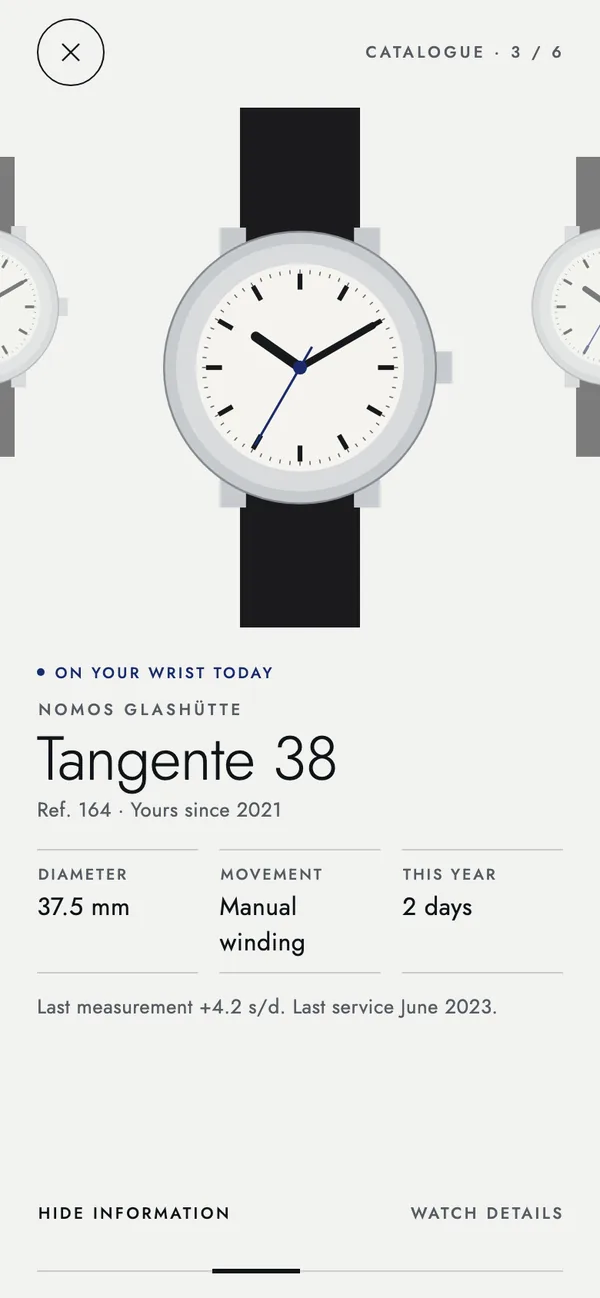
The catalogue view shows one watch per page; swipe left and right to browse. At first only the brand and model show; open the details for diameter, movement, days worn this year and the last reading.

The catalogue view: one watch shown large, with the On your wrist today mark, diameter, movement and days worn this year below.

07Backup and export

Your data is yours

Everything lives in a database on your phone and works offline. Backups go to the Kadranname folder in your own Google Drive or, on iPhone, iCloud; the last ten versions are kept, and your settings travel with the backup.

Export your collection whenever you like as a single zip file with your records (CSV and JSON), photos, documents and settings; this is open to everyone.

Membership adds cloud backup, sharing (the year picture, one watch's picture, photos) and PDF files: one watch's full record, or an inventory of the whole collection for insurance.

The Backup screen: Backup up to date, today 09:12, the Kadranname folder in Google Drive and the versions kept.

08Privacy

No account, no server

There is no account to create. The developer has no server that receives or stores what you enter; your watches, photos and records stay on your phone, and the developer cannot see them.

Data leaves your phone only through things you start: backups to your own cloud account, AI queries with your own key, the feed sources you add. You can lock the app with your face or fingerprint.

In the free version Google shows ads; Google's ad library sends data such as the advertising ID, IP address and device information to Google. Nothing from your collection is added to ad requests. For members the ad library is never started.

The full privacy policy

09Languages

In eleven languages

The whole app switches to the language you choose, and specifications and history are fetched in it. Translations other than Turkish and English are machine translations; if you spot a mistake, write to us.

  • English
  • Türkçe
  • Deutsch
  • Français
  • Español
  • Português
  • Nederlands
  • Русский
  • 日本語
  • 한국어
  • 中文

[email protected]

10Phone and tablet

Side by side on a large screen

On a tablet or the open screen of a foldable, a side menu appears and the collection sits next to the page of the watch you choose. The journal opens into two columns.

The tablet layout: the menu and the grid of watches on the left, the selected watch's page on the right.

Getting started

The first day

  1. Add your first watch

    A brand and a model are enough. Take a photo or pick one from your gallery and set the square; fill in the rest later.

  2. Note what you wear today

    Pick by hand from the On your wrist today strip or take a wrist photo. Set a daily reminder if you like.

  3. Take a reading

    The Measure tab opens on the method that suits the watch: the microphone for a mechanical watch, the camera for quartz.

  4. Turn on backup

    In Settings, export a zip file; with membership you can connect backup to your own Google Drive or iCloud account.

PricingThere will be a free version and a membership. Prices will be announced when the app is released.

Pricing page